
Download WinExt Registry Fixer – Free Registry Cleaner & PC Optimization Tool for Windows
Keep your Windows PC running smoothly with WinExt Registry Fixer, a powerful, free utility designed to repair registry errors, clean junk files, and optimize system performance. Developed by TriSun Software Limited, this lightweight yet robust tool helps users detect and fix common registry issues such as invalid file associations, missing DLLs, orphaned registry entries, and corrupted startup items. With advanced scanning capabilities and an intuitive interface, WinExt Registry Fixer is ideal for both beginners and advanced users looking for a secure, efficient alternative to paid registry cleaners like Registry Reviver.
Whether you're dealing with slow boot times, app crashes, or cluttered disk space, this software offers a comprehensive solution to restore your PC’s speed and stability. Its ability to scan specific registry categories—like ActiveX controls, shell extensions, device drivers, and fonts—gives you full control over what gets analyzed. Plus, with automatic backup creation before any fixes, you can repair your system safely.
The tool also includes a built-in duplicate file finder and disk cleanup function, making it a one-stop solution for PC maintenance. Available for free download on Windows, WinExt Registry Fixer is regularly updated to support the latest OS versions, ensuring long-term reliability and security.
Advanced Registry Scanning & Repair Features
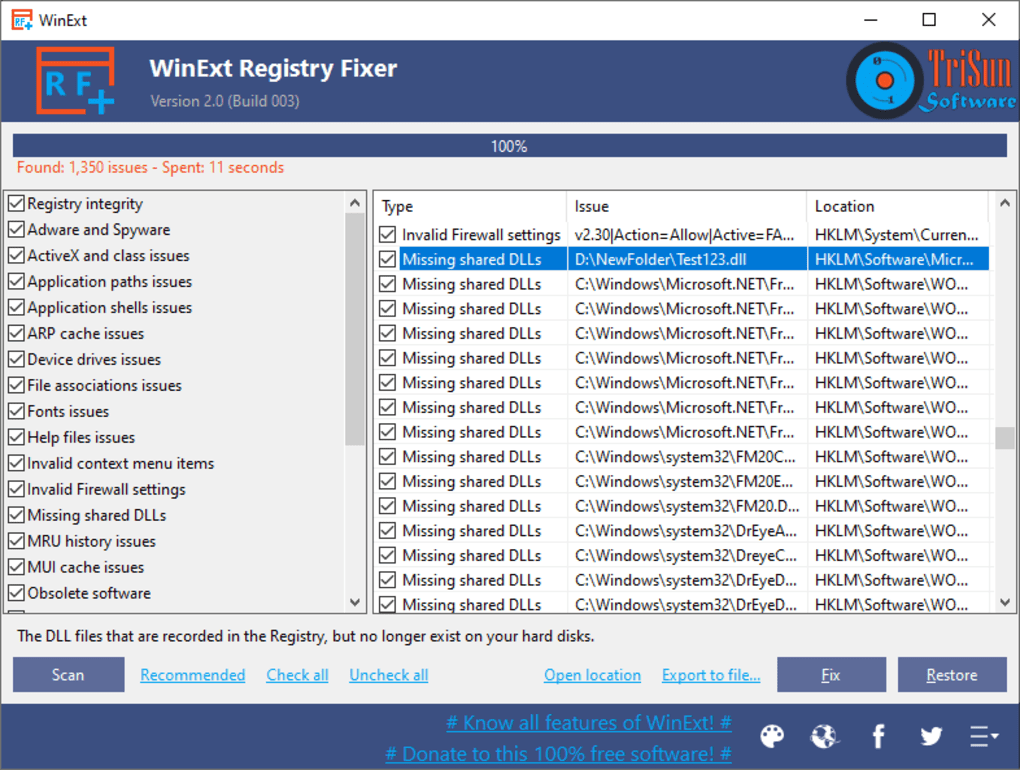
WinExt Registry Fixer excels in its ability to deeply scan your Windows registry for a wide range of issues that can degrade system performance. The software detects and identifies problematic entries such as missing shared DLLs, invalid context menu items, broken file associations, obsolete software remnants, and corrupted MUI cache files. These hidden errors often go unnoticed but can lead to application crashes, slow startup times, or even system instability. What sets this tool apart is its granular control—users can selectively enable or disable specific registry categories for scanning, including ActiveX and class keys, application paths, shell extensions, device drivers, fonts, and more. This level of customization allows for targeted repairs without risking unintended changes to critical system components.
After the scan completes, you’re presented with two options: fix all detected issues automatically or export the results for manual review. The export feature supports multiple formats—TXT (tab-separated), CSV, and Excel—making it easy to analyze the findings in detail before applying changes. This is especially useful for advanced users who prefer to audit changes before execution.
Additionally, the software automatically creates a backup of the registry before any modifications are made, ensuring you can restore your system to its original state if something goes wrong. This safety net is essential, particularly for beginners who may not fully understand the implications of registry edits. With regular updates and a lightweight footprint, WinExt Registry Fixer maintains optimal performance while offering peace of mind during repairs.
Another standout feature is the ability to schedule automatic scans. You can set the tool to run at regular intervals—daily, weekly, or monthly—ensuring your registry stays clean and optimized over time. This proactive approach prevents small issues from accumulating into major system slowdowns. Whether you're managing a personal desktop or a small business workstation, the combination of deep scanning, smart filtering, and scheduled maintenance makes WinExt Registry Fixer a reliable long-term solution for Windows optimization.
Comprehensive Disk Cleanup & Duplicate File Finder
Beyond registry repair, WinExt Registry Fixer doubles as a powerful disk cleanup and duplicate file removal tool—making it a versatile all-in-one utility for maintaining your PC’s health. Over time, temporary files, cache data, log files, and system leftovers from uninstalled programs can consume significant disk space. This clutter not only slows down your system but can also reduce available storage, especially on smaller SSDs. With WinExt Registry Fixer, you can quickly identify and remove these unnecessary files with just a few clicks.
The built-in disk cleanup function scans your system for temporary files, browser cache, Windows update leftovers, and other junk data that accumulate over time. Unlike basic cleanup tools, WinExt goes further by analyzing file types and sizes, allowing you to preview what will be deleted before confirming. This transparency helps prevent accidental removal of important data. The duplicate file finder is another game-changer—using intelligent algorithms, it scans your hard drive to locate identical or near-identical files (like photos, documents, or downloads) that take up redundant space. Once found, you can selectively delete duplicates, reclaiming valuable storage without losing essential files.
These features are seamlessly integrated into the main interface, so you don’t need to switch between multiple tools. The tool’s lightweight design ensures it runs efficiently in the background without hogging CPU or RAM. It’s also safe to use—no intrusive ads, no bundled malware, and no data collection. Whether you're a casual user looking to free up space or a power user managing large media libraries, WinExt Registry Fixer delivers real performance gains with minimal effort. The ability to schedule cleanup tasks ensures your system stays optimized automatically, reducing the need for manual intervention.
Easy Installation, User-Friendly Interface & Compatibility
Getting started with WinExt Registry Fixer is straightforward and hassle-free. The software is available for free download on Windows 7, 8, 10, and 11, making it compatible with a wide range of systems. Installation requires just a few clicks—no complex setup or registration is needed. Once installed, the clean, minimalist interface makes navigation intuitive, even for non-technical users. All major functions—scanning, cleaning, backup, and scheduling—are accessible from the main dashboard, with clear icons and tooltips guiding you through each step.
For those new to registry editing, the built-in help guide is an invaluable resource. It provides detailed explanations of each registry category, potential risks, and recommended actions. This educational component empowers users to make informed decisions rather than blindly accepting automatic fixes. The tool also includes real-time status updates during scans and repairs, so you always know what’s happening. You can pause, resume, or cancel operations at any time, giving you full control over the process.
WinExt Registry Fixer is designed to be lightweight and efficient. It uses minimal system resources, runs quietly in the background, and doesn’t interfere with other applications. This ensures your daily workflow remains uninterrupted. The software is regularly updated by TriSun Software Limited to maintain compatibility with new Windows updates and security patches. With no ads, no bloatware, and a commitment to user privacy, it stands out as a trustworthy free tool in a crowded market.
Pros & Cons Summary
- Pros:
- Free to download and use with no hidden costs
- Comprehensive registry scanning with selective category control
- Automatic backup creation before any repair
- Supports scheduled scans and automated cleanup
- Powerful duplicate file finder and disk cleanup tool
- Lightweight, fast, and safe with no malware or ads
- Regular updates ensure compatibility with latest Windows versions
- Beginner-friendly with built-in help guide and intuitive UI
- Cons:
- Advanced features may be overwhelming for absolute beginners
- No Mac or mobile (Android/iOS) version available
- Limited to Windows operating systems only
- Some users may need to manually verify repair suggestions
Frequently Asked Questions (FAQ)
Is WinExt Registry Fixer safe to use?
-
Yes, WinExt Registry Fixer is safe to use. It creates a full backup of your registry before making any changes, allowing you to restore your system if needed. The software is free from malware, ads, and bloatware, and is developed by a reputable company, TriSun Software Limited.
Can I use WinExt Registry Fixer on Windows 11?
-
Yes, WinExt Registry Fixer is fully compatible with Windows 11, as well as Windows 10, 8, and 7. The developers regularly update the software to ensure seamless performance across all supported Windows versions.
Does WinExt Registry Fixer offer a trial version?
-
WinExt Registry Fixer is completely free to download and use. There is no trial version—everything is available at no cost, including advanced features like scheduled scans and export options.
Can I undo changes made by WinExt Registry Fixer?
-
Yes, the software automatically creates a backup of your registry before any repairs. If you encounter issues after a fix, you can restore the original registry using the built-in restore function.
Is there a Mac or mobile version of WinExt Registry Fixer?
-
Currently, WinExt Registry Fixer is only available for Windows. There are no official versions for Mac, Android, or iOS. However, the tool is highly effective for Windows users seeking a reliable free registry cleaner.
Final Verdict & Call to Action
WinExt Registry Fixer is a must-have tool for anyone looking to maintain a clean, fast, and stable Windows PC. With its powerful registry repair, intelligent disk cleanup, and duplicate file detection features, it delivers real performance improvements without compromising safety. The ability to schedule scans, export results, and restore backups makes it suitable for both beginners and experienced users. While it’s limited to Windows, its free, secure, and regularly updated nature makes it a top choice in the category of registry optimization tools.
If you're tired of slow boot times, app crashes, or cluttered storage, download WinExt Registry Fixer today and take full control of your system’s health. It’s free, reliable, and designed to keep your PC running at peak performance for years to come.







